DATAOPTIMIZATION
Product data optimization
From catalogsto a sourced product master.
Every extracted value links back to the exact page and position in the source document. Anything that can't be confirmed is left blank for review instead of guessed.
Photoelectric sensors · Schema v3
14 sourced · 2 to review
| Attribute | Unit | ZX-200 | ZX-200W |
|---|---|---|---|
| Sensing method | enum | ||
| Sensing distance | mm | ||
| Protection | enum | ||
| Response time | ms | ||
| Beam angle | ° | ||
| Supply voltage | V DC | ||
| Dimensions | mm | ||
| Current draw | mA |
- Sourced: page and position recorded
- Review: not stated, left blank rather than guessed
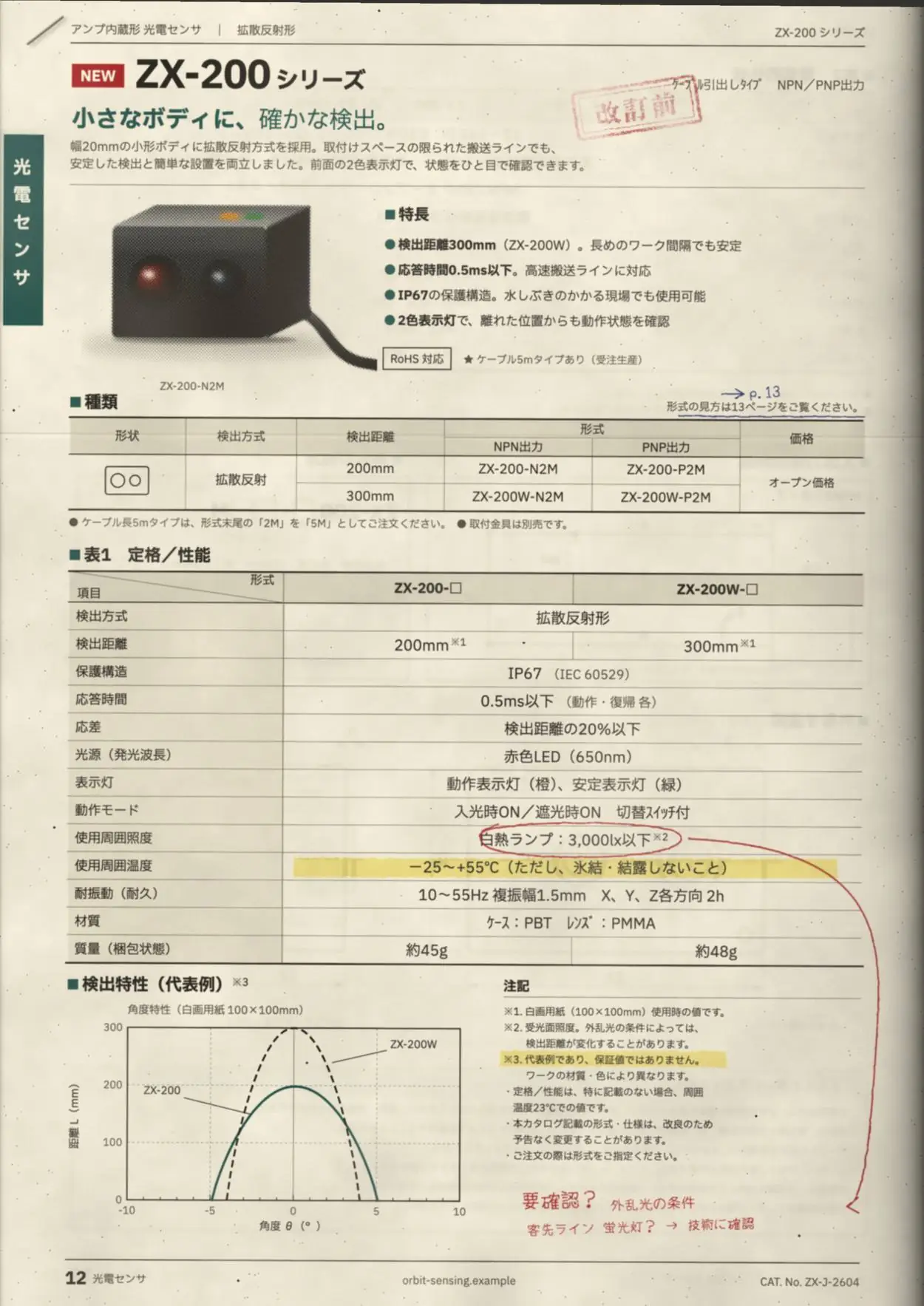
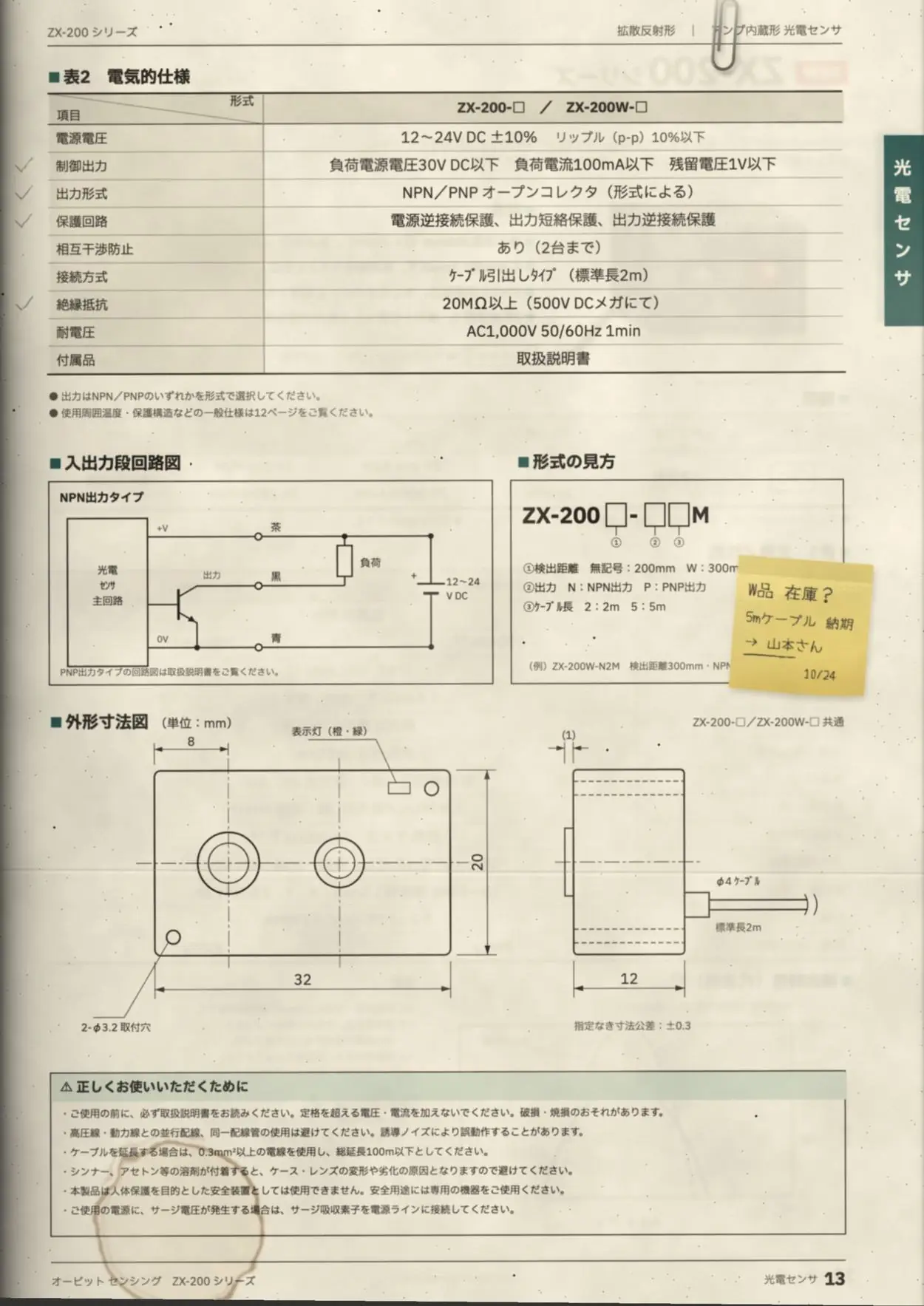
オービット センシング ZX-200 シリーズ アンプ内蔵形 光電センサ(拡散反射形) CAT. No. ZX-J-2604 p.12–13
表1 定格/性能(ZX-200-□ / ZX-200W-□)
- 検出方式:拡散反射形
- 検出距離:200mm※1 / 300mm※1
- 保護構造:IP67(IEC 60529)
- 応答時間:0.5ms以下(動作・復帰 各)
- 応差:検出距離の20%以下
- 光源(発光波長):赤色LED(650nm)
- 表示灯:動作表示灯(橙)、安定表示灯(緑)
- 動作モード:入光時ON/遮光時ON 切替スイッチ付
- 使用周囲照度:白熱ランプ:3,000lx以下※2
- 使用周囲温度:−25〜+55℃(ただし、氷結・結露しないこと)
- 耐振動(耐久):10〜55Hz 複振幅1.5mm X、Y、Z各方向 2h
- 材質:ケース:PBT レンズ:PMMA
- 質量(梱包状態):約45g / 約48g
検出特性(代表例):ZX-200 200mm・±5° / ZX-200W 300mm・±4°
表2 電気的仕様(ZX-200-□ / ZX-200W-□)
- 電源電圧:12〜24V DC ±10% リップル(p-p)10%以下
- 制御出力:負荷電源電圧30V DC以下 負荷電流100mA以下 残留電圧1V以下
- 出力形式:NPN/PNP オープンコレクタ(形式による)
- 保護回路:電源逆接続保護、出力短絡保護、出力逆接続保護
- 相互干渉防止:あり(2台まで)
- 接続方式:ケーブル引出しタイプ(標準長2m)
- 絶縁抵抗:20MΩ以上(500V DCメガにて)
- 耐電圧:AC1,000V 50/60Hz 1min
- 付属品:取扱説明書
外形寸法図(単位:mm):32×20×12
- Value
- IP67 · Protection · ZX-200
- Printed
- IP67
- Source
- p.12 · Table 1 · Row 3
Shown with a fictional product, the ZX-200.
Measured in production
ZAG Data Optimization, in numbers.
Running in production at large enterprises. Product-master figures measured Sep–Oct 2026.
- values published with their source
- 93,959
- 39 catalogs, every value with its page and position
- products delivered from one upload
- 2,945
- across 142 category sheets
- mismatches
- 0
- in 27,418 product-master cells transferred
- of filled cells carry a source highlight
- 100%
- click any cell and see the printed region
- rows delivered, no duplicates
- 1,000
- a worker was hard-killed mid-batch; 0 duplicates
- citations re-pointed without a re-run
- 5,120
- corrected in place in a delivered package
What we take on
From the documents arriving to the products going live.
- 01
Catalogs and spec sheets to a product master
From PDFs, spreadsheets, PIM exports and images to a product master, model by model and attribute by attribute.
- 02
Retailer and PIM import sheets
Category sheets filled in the receiving side's own format.
- 03
PIM migration
Old data moved onto the new PIM's attributes, with every difference checked.
- 04
Schema maintenance
Category attribute definitions kept under version control and maintained as they change.
- 05
Image labeling for DAM
Product images labelled so your DAM can find them.
- 06
Catalog uploads to your PIM
The finished data loaded into the PIM you use.
How a job runs
Drop everything into one job. It works through it in order.
Spec sheets, catalogs, registration sheets and product photos go into a single job, and the system works through them in this order.
Model numbers and JANs, discovered first.
Four files go into the job, a PDF, a spreadsheet, a Word file and a photo, and 12 products are found with their model numbers and JANs.
Each document's structure, understood.
On each catalog page, the tables, graphs, dimension drawings and notes are told apart.
Scans included, with OCR.
All 24 pages are read, the scanned ones with OCR.
In the receiving format, category by category.
The retailer's registration sheet is filled in, one category tab at a time, each cell with the page it came from.
A second read and cross-checks. No value without a printed source.
A second read checks every cell. One mismatch is settled by reading the page again; one value the documents never state is left blank, marked for review.
After delivery, add documents to fill what is still blank. Corrections go into the delivered files in place.
What you receive
Delivered in a form you can check.
delivery_package/
WEB_sensors.xlsx … · MD.xlsx
Filled workbooks
One sheet per category, plus the master sheet.
errors_WEB.xlsx
Error workbook
Every blank or uncertain cell, listed with its reason.
source per cell
Provenance
Select a cell and the printed region lights up on the source page.
correction_history
Correction history
Post-delivery fixes recorded on a verified history sheet.
originals/
Original files
The documents you sent, included as they were.
Who it's for
Built for this work.
- Manufacturers
- New-product registration, and a sheet for every channel.
- Distributors
- Supplier documents into your own product master.
- SIers and PIM projects
- Migration and the initial data load.
How to start
Start with your own documents.
- 01
A demo on your data
We process your real catalogs and show you the result. Allow about a week.
- 02
Managed operations
Our engineers run it; your team uploads and reviews.
- 03
Monthly reporting
Progress and infrastructure cost, reported every month.
Pricing is quoted per engagement, based on your documents and volume.
Questions
- What documents can you read?
- Catalog and spec-sheet PDFs (scans included), Excel registration sheets and price lists, PIM exports and product images, all in one job.
- What happens to values you can't confirm?
- We don't guess. The cell stays blank and goes into the error workbook with its reason, for review.
- What if an error turns up after delivery?
- We correct the delivered files in place and record the change. Nothing is re-run from scratch.
- Where is the data processed?
- On Microsoft Azure, in the Japan East region.
- How is it priced?
- Per engagement, based on your documents and volume. Start with a demo on your own files.
Send us a real catalog. We'll show you the result in about a week.